
WordPress SEO optimizes a WordPress website so that it appears higher in the Google ranking and will generate more organic traffic to it. SEO is all about AI, UX, website speed, and content usefulness in 2026. WordPress is one of the best platforms to build an SEO friendly site because it provides an option for customization, powerful plugins, and easy content administration. As a beginner, blogger, business owner, or freelancer, WordPress SEO learning will help you gain increased traffic, improved visibility, and increased growth for your online business.
What is this WordPress SEO?
The optimization of a WordPress site to be ranked higher in Google and other search engines is known as WordPress SEO. It is beneficial for boosting organic (natural) traffic, visibility, and website performance.
The important elements involved in WordPress SEO are:
- Keyword optimization
- Fast website speed
- Mobile-friendly design
- Content optimization
- Technical SEO improvements
- Internal linking
- Better user experience
WordPress is a great choice for blogs, which allow you to customize them, in addition to having lots of powerful plugins, and manage your website very easily. It is an SEO-friendly blog. The primary, overriding mission of WordPress SEO is to increase traffic while excluding paid advertising.
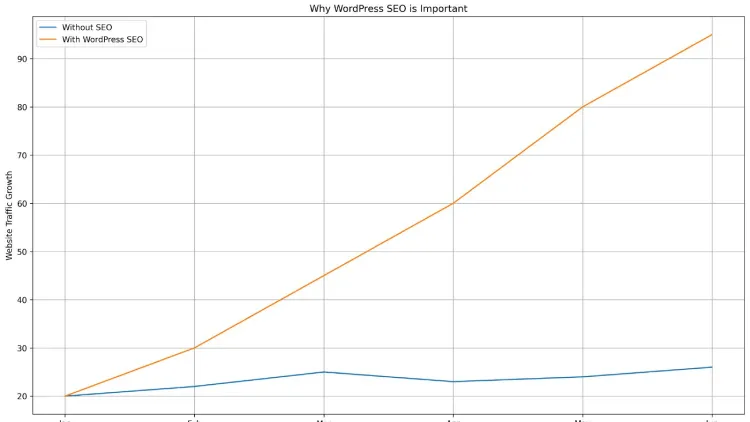
Why WordPress SEO is Important
An internet site is hard to find online without SEO. The best websites in the world can still fail to show up if search engines do not comprehend and/or position the page.
WordPress SEO serves as an asset for businesses, bloggers, and service providers to reach the right target audience.
Benefits of WordPress SEO
Higher Search Engine Rankings
If your site is optimized properly, Google will be able to better comprehend your content. This will help with improving their odds of being on the first page.
Increased Organic Traffic
Organic traffic will refer to free traffic flowing in through search engines. It is possible to use Strong WordPress SEO to get visitors for a long time and regularly.
Better User Experience
Incorporating keywords into a site isn’t SEO any longer. User experience, page speed, readability, and mobile performance have been a Google priority.
Stronger Brand Authority
First page results tend to be perceived as more reliable and polished websites.
More Leads and Sales
When companies use WordPress SEO, they tend to see more inquiries, customers, and sales since they appear more prevalent online.
How WordPress SEO Works
The search engines crawl a website using automatic bots. WordPress SEO assists these bots for them. WordPress SEO assists these bots for them.
Google assesses websites from a lot of factors, such as:
- Content quality
- Website speed
- Mobile usability
- Backlinks
- User engagement
- Technical structure
- Security
- Keyword relevance
With the advent of more sophisticated AI search systems in 2026, SEO is evolving quickly. But SEO is by no means gone. Rather than vanishing, it is getting smarter, concentrating on good content.
Nowadays, it’s all about WordPress SEO that immediately encompasses:
- Human-focused content
- Technical optimization
- AI-assisted workflows
- User intent analysis
- Semantic search optimization
Companies that enable adjustment will continue to enhance their traffic effectively.
Need help improving your website rankings?
At TechishWeb, we offer professional WordPress SEO services, including technical optimization, keyword research, content SEO, and complete website audits to help you grow organic traffic and boost visibility on Google.
Best WordPress SEO Plugins
SEO plugins make optimizing easy and make it easier for those who aren’t SEO experts to do WordPress SEO efficiently.
Your trusty WordPress SEO Plugins series
Yoast SEO
This is one of the trusted WordPress SEO plugins that is installed by WordPress users.
Features include:
- XML sitemap generation
- Meta title optimization
- Readability analysis
- Canonical URLs
- Schema support
Easy to use for beginners and professionals.
Rank Math
Rank Math has been very popular due to the advanced free features.
Benefits include:
- AI content suggestions
- Rich snippets integration
- Keyword tracking
- SEO scoring
- Search Console integration
Popular ranking experts are now opting for Rank Math as a result of its expert WordPress management capabilities.
All-in-One SEO
All in One SEO has an intuitive interface and advanced SEO capabilities.
It works well for:
- Blogs
- Small businesses
- Local SEO
- WooCommerce stores
Most SEO plugins have a free version – WordPress SEO isn’t free, but it can be started for free anyway. All paid tools offer extra advanced features.
Choosing an SEO-Friendly WordPress Theme
Themes are pivotal to website performance and SEO rankings.
An improperly coded theme can cause slow web pages and affect user experience.
Features of a Good SEO Theme
- Fast loading speed
- Mobile responsiveness
- Lightweight coding
- Clean design
- Schema compatibility
- Accessibility optimization
The popular SEO friendly themes are:
- Astra
- GeneratePress
- Kadence
- OceanWP
Amongst those that build websites on WordPress, you have a lot more freedom than Wix or GoDaddy website builders do. While the SEO options in Wix have been enhanced, WordPress has an edge with regard to customization and long-term SEO control.
Additionally, numerous businesses compare Shopify and WordPress regarding SEO. Shopify is a good choice for eCommerce stores, while WordPress offers more flexibility in terms of content marketing and advanced SEO optimization.
WordPress SEO Keyword Research
Research and its importance can’t be overstated when it comes to SEO.
If you don’t use the right keywords, your content will never reach the right people.
How to Find Keywords
Keyword research is about:
- Search volume
- Competition level
- User intent
- Traffic potential
The most popular tools to use for popular keywords are:
- Ahrefs
- SEMrush
- Ubersuggest
- Google Keyword Planner
Types of Keywords
Short-Tail Keywords
These are general terms that are competitive.
Example:
- WordPress SEO
Long-Tail Keywords
Often specific and related phrases.
Example:
- The best WordPress SEO strategies for beginners in 2026 are listed below. Below are the best WordPress SEO strategies for beginners in 2026.
Long tail keywords typically convert with greater effectiveness as they better align with users’ needs.
Understanding Search Intent
Nowadays, WordPress SEO is all about search intent.
Google is looking to rank content that actually provides solutions.
A searcher’s intent can lead to four main categories of SEO:
They are often dubbed the four pillars of SEO since all of them help to boost rankings.
On-Page WordPress SEO
On the other hand, on-page SEOs optimize the visible elements of the website.
Aiding both search engines and users in comprehending content.
Optimize Your Titles
Your titles should:
- Use the core word in your search query.
- Sound natural
- Encourage clicks
- Stay under 60 characters
Well-crafted titles can make a huge difference in click-throughs.
Write SEO-Friendly URLs
Simple URLs are easier for search engines because they are easier for humans.
- Bad URL: website.com/page?id=456
- Good URL: website.com/wordpress-seo-guide
Use Headings Properly
Headings are used to help organize and make it easier to read the content.
Use:
- H1 for main titles
- H2 for sections
- H3 for subsections
Creating a hierarchy on a page with proper heading structure is beneficial for understanding the page hierarchy by Google.
Optimize Meta Descriptions
Meta descriptions are a text that gives a summary of your text in search results.
The good description of meta should:
- Include keywords naturally
- Be persuasive
- Stay under 160 characters
Well-worded descriptions will increase click-through rates.
Seamless WordPress SEO content optimization
Content is still one of the top WordPress SEO ranking factors.
While AI tools can generate ideas and boost productivity, there is still a need for human focus at the heart of the process.
Write High-Quality Content
High-performing content should:
- Solve real problems
- Be easy to read
- Include updated information
- Match search intent
- Provide unique value
With time and practice, SEO writing isn’t so wrenching after all. The writer must be able to find a balance that makes their content readable, a balance that includes the proper use of keywords and the structure of the text, ensuring that it is engaging to users.
There is a straightforward method to master fundamental SEO writing that calls for 10 days or significantly less — if beginners stick to constant practice of optimizing their content for keywords, utilizing headings, formatting, and structuring their material.
Utilize Appropriate Keyword Density
The ratio of keywords in the text should not be too high.
With excessive use of keywords, results are likely to suffer in terms of readability and ranking.
A good keyword strategy consists of:
- Main keywords
- Related terms
- Semantic phrases
- Natural variations
The 80/20 rule of SEO should not be missed. Typically, 80% of site traffic comes from 20% of the optimized pages. This is why it’s essential to concentrate on good pages rather than profusely on lesser content.
Use Internal Linking
Internal links help:
- Improve website navigation
- Increase crawl efficiency
- Transfer the control from one page to another.
- Extend the length of their stay. Get visitors to stay for longer.
An effective internal linking structure can make WordPress sites perform much better in terms of search engine optimization.
Add External Links
Including links to credible sources can boost your credibility and user trust.
Make sure that external links are used where appropriate and not unnecessarily.
Technical WordPress SEO
Technical SEO enriches the efficiency of your website in the background.
Nobody can get a website to perform properly if there are technical problems.
Improve Website Speed
The speed of your website has a direct impact on your rankings and the user experience.
If one needs to speed up, one can do so in the following ways:
- Compressing images
- Using caching plugins
- Choosing fast hosting
- Using a CDN
- Removing unnecessary plugins
Some popular plugins for caching are:
- WP Rocket
- LiteSpeed Cache
- W3 Total Cache
A fast website will lower bounce rates and boost conversions.
Mobile Optimization
With the current change, Google is now shifting to a mobile-first experience.
Your WordPress website should be:
- Look crisp and beautiful on mobile devices. Function flawlessly on their devices.
- Leverages Millio quickly on mobile data.
- Use legible text sizes.
- Have responsive layouts
Most of the modern WordPress themes are already mobile-friendly.
XML Sitemap Optimization
An XML site map provides search engines with a way of knowing what pages are on the site.
There are several SEO plugins available that automatically produce sitemaps.
It is advisable to submit these to:
- Google Search Console
- Bing Webmaster Tools
This will enhance the efficacy of indexing.
Secure Your Website with HTTPS
Secure websites are a ranking factor.
Confidentiality safeguards user information and enhances trust.
Benefits include:
- Better rankings
- More security
- Increased credibility
- Improved browser trust
A majority of the hosting companies currently give away free SSL certificates.
Optimize your images for SEO on your WordPress site
In WordPress SEO and user experience, images are a vital component.
Also, by optimizing your pictures properly, you can drive traffic to them via Google Images.
Image SEO Tips
Compress Images
Larger image sizes increase the speed of a website.
Use tools like:
- TinyPNG
- ShortPixel
- Imagify
Add Alt Text
The alt text is used to assist the search engines’ understanding of the image content.
Example:
- This is an example of a WordPress SEO dashboard.
Use Descriptive File Names
Don’t use ambiguous terms such as:
- IMG123.jpg
Instead use:
- wordpress-seo-checklist.jpg
Local WordPress SEO
Businesses use local SEO to attract their local customers.
Agencies, shops, restaurants, and service providers need to be particularly mindful of this.
Local SEO Tips
- Create a Google Business Profile
- Use local keywords
- Add contact information
- Collect reviews
- Build local citations
One of the fastest methods for small businesses to achieve targeted traffic is local WordPress Search Engine Optimization.
Common WordPress SEO Mistakes
There are some common SEO errors that many websites make that could be avoided.
Common Errors
- Keyword Stuffing: Keyword stuffing can give a horrible user experience!
- Slow Website Speed: Engagement and rankings are adversely affected by heavy websites.
- Duplicate Content: Duplicate or duplicate material on sites reduces the effectiveness of SEO.
- Ignoring Mobile Optimization: In the present day, most of the users are traveling on mobile devices.
- Weak Content Structure: The content is hard to read due to bad formatting.
- Publishing Without Strategy: SEO must be carried out on a monthly basis.
Time-to-time Updates, Content Audits, and optimizations are needed to retain rankings over time.
Advanced WordPress SEO Tips
For websites to outrank the competition, some advanced optimization techniques will be required.
Use Schema Markup
Schema enhances search engines’ understanding of the content.
Benefits include:
- Rich snippets
- Better visibility
- Improved click rates
Take proactive steps to enhance Core Web Vitals.
Optimize Core Web Vitals
Core Web Vitals focus on:
- Loading speed
- Visual stability
- Interactivity
These metrics play a greater role in WordPress SEO and have become more significant these days.
Create Topic Clusters
The topic clusters will help establish authority over certain topics.
Example cluster:
- WordPress SEO basics
- Technical SEO
- Local SEO
- SEO plugins
- AI SEO tools
This is to enhance the semantic relevance.
Use AI Tools Carefully
While AI-powered tools streamline SEO processes, they still can’t replace SEO entirely.
Some of the most popular AI tools for WordPress are:
- ChatGPT
- Jasper
- Surfer SEO
- Frase
AI can help with:
- Content ideas
- Keyword suggestions
- SEO audits
- Meta descriptions
- Content outlines
For instance, ChatGPT can help deliver a level of SEO audit service to pinpoint gaps, optimization suggestions, and technical guidelines. But, for accuracy and strategy, it’s also crucial to have human oversight.
Best Tools for WordPress SEO
The key is using the right tools that can increase efficiency.
Recommended SEO Tools
- Google Search Console: Monitors the performance of keywords and indexing.
- Google Analytics: Offers indications of the experiences of visitors.
- Ahrefs: Good content for backlinks and competitor analysis.
- SEMrush: There are no significant drawbacks; it is very useful for keyword research or site audit.
- Screaming Frog: Useful for performing a technical audit of your website.
WordPress SEO for the future in 2026
AI-driven search experiences remain a driving force in shaping the continued evolution of SEO.
Nevertheless, SEO remains extremely worthwhile and lucrative.
Major SEO Trends
- AI-assisted search
- Helpful content systems
- Voice search optimization
- Faster websites
- User experience signals
- Entity-based search optimization
Even businesses require organic traffic and online visibility, and SEO professionals are still in demand. SEO is regarded as a valuable skill in the electronic domain, which can create solid career and business opportunities. While it initially sounds like a daunting task, SEO can be learned more easily with practice, a few real projects, and continued learning.
WordPress vs Other Website Platforms
WordPress is compared with other platforms.
WordPress vs Wix
WordPress has the following advantages:
- Better scalability
- Greater SEO flexibility
- More plugins
- Stronger customization
The common approach of large businesses is to stick with WordPress for extended growth.
WordPress vs Shopify
Shopify is perfect for an online store that’s easy to use, and WordPress is better for blogging and SEO features.
If your site has more content, then WordPress can often make for a better SEO.
WordPress vs GoDaddy Website Builder
GoDaddy website builder is user-friendly and simple to use, yet versatile.
WordPress offers:
- Full ownership
- Better SEO control
- Advanced plugin ecosystem
- Greater scalability
One of the most important things to keep in mind is that your website is not owned by WordPress, but rather it is maintained by your provider. In case you have your own WordPress web hosting, you can have 100% control over your website files and content.
Conclusion
In 2026, WordPress SEO continues to be one of the most effective strategies for driving website traffic and boosting online visibility. Through enhancing the material quality, speeding up the website, optimizing the keywords, and offering a much better user experience, websites can enjoy improved Google position and long-term growth.
Understand the advantages of WordPress SEO. Learn the Pros of WordPress SEO.
- Increases organic traffic
- Writes engaging, high-quality content
- Builds website authority
- Enhances user experience
- Regulates long-term growth of the business
The flexibility, customization options, and pair of highly-powered SEO plugins make WordPress a prime choice for SEO.
Frequently Asked Questions
1. Well, could WordPress be a good choice for SEO in 2026?
Absolutely, WordPress continues to be a great website platform for SEO since it allows customization, has rapid performance, mobile-optimized themes, and has terrific Website optimization (SEO) plugins.
2. Which is the best SEO plugin for WordPress?
Yoast SEO plugin, Rank Math, and All in One SEO are some of the most commonly used WordPress SEO plugins for WordPress. Yoast SEO is ideal for users who need to implement the basics, whereas Rank Math is used for advanced capabilities.
3. How easy is it to get started with WordPress SEO?
Indeed, many new website owners can practice the basics of WordPress SEO in a couple of days by mastering the concepts of keywords, website optimization, page speed, and SEO plugins.
main benefits of WordPress SEO?) make it short
4. What are the benefits of WordPress SEO?
Yes, specifically, when it comes to WordPress, good WordPress SEO helps improve your Google ranking, boosts your organic traffic, raises awareness, and attracts more prospective consumers naturally.