


A 404 error occurs when a web page on a website is missing or is unavailable. When the page is deleted, moved, or the URL button is entered incorrectly. Addressing 404 errors is crucial in 2026 as it can impact a website’s SEO, user experience, and trust.
What is a 404 Error?
A 404 error indicates that a Web page was not found on the server from which it was requested. Typically occurs when a page is deleted, moved, or if a wrong URL is used.
The most common reasons for a 404 error:
- Deleted webpage
- Incorrect URL
- Broken internal link
- Renamed Moved page without redirect
- Mistyped web address
Common 404 error messages:
- 404 Not Found
- Page Not Found
- HTTP 404
- Error 404
The URL requested was not found on this server.
The 404 status code (or 4xx codes for general client-side errors) is part of the HTTP 400 category of client-side errors.
How Does a 404 Error Happen?
Many causes might provide the error message of 404. This is due to the fact that most of the time, the requested page actually does not exist, or there is a wrong URL.
The following are common reasons for a 404 error:
- Deleted Webpages: Sometimes, website owners delete old pages, products, or blog posts from their website(s). If, after the removal, visitors attempt to view those pages, they get a 404 error.
- Changed URLs: Switching from one type of permalinks to another or adding a new redirect can lead to a 404 error. This is often seen when refreshing a website or migrating to a new CMS.
- Typing Mistakes: Incorrect URLs could be typed by the user in the browser’s address bar. For even the slightest of errors, there’s a 404 error waiting to happen.
- Broken Internal Links: Links that connect to pages that don’t exist create navigation problems and lead to more 404 error logs on a site.
- Incorrect External Backlinks: Links to content may be incorrect on other sites. If they click on those broken backlinks, they could get a 404 response.
- Networking Issues: Server or DNS Problems: Some webpages may not display properly due to temporary web server or DNS problems.
- Website Migration Errors: When migrating the website, pages can be relocated without the proper redirect, resulting in missing pages.
It’s normal to experience a 404 error as things are on the constant move on websites.
Types of 404 Errors
There are various types of 404 errors. There are several versions depending on how it’s treated if a server or a website has a missing page.
1. Standard 404 Error
The default “Page Not Found” message from the server.
2. Soft 404 Error
A 404 that occurs as a result of a locator error on a server but instead sends back a “200 OK” status code, is called a soft 404. Search engines can consider these types of pages to be cheap clicks or bamboozle.
3. Custom 404 Error Page
These days, a lot of sites produce custom-made 404 error pages that assist make an individual experience better. Sometimes, these web pages include:
- Homepage links
- Search bars
- Navigation menus
- Related articles
- Humor/Creative design
When using custom pages, users will remain on the website and won’t bounce back.
4. Temporary 404 Errors
In some cases, pages are unable to be accessed for a short period due to server maintenance or technical problems.
The importance of 404 Errors in SEO
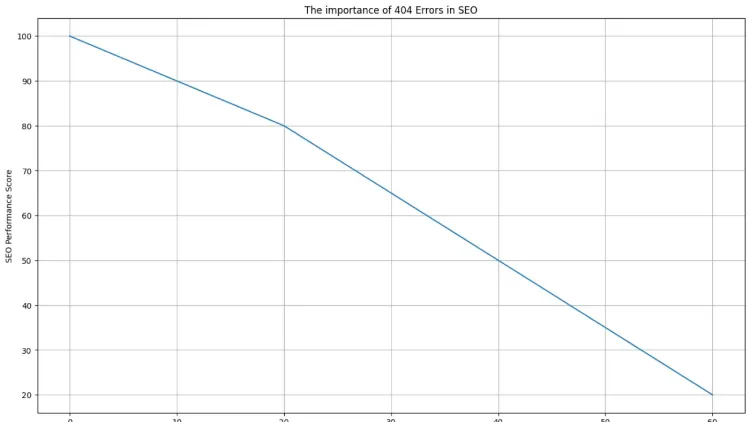
Broken pages and major 404 errors can impact website performance in terms of SEO.
On the other hand, search engines (like Google) periodically visit websites to find and index pages. If your website is consistently failing to provide the URLs a crawler is expecting, it can affect your website’s crawl efficiency and crawl authority.
404 Errors can cause SEO problems
- Poor User Experience: Bad page load performance is the culprit behind unhappy tourists. There is a correlation between frustration and high Bounce Rates.
- Lost Backlink Value: SEO value of backlinks from external sites may be lost if these pages are removed, unless there are redirects to be implemented.
- Reduced Crawl Budget: Websites are given a “crawl budget’ by search engines. Each time someone visits a 404 page, there’s a corresponding waste of those resources.
- Lower Rankings: When websites have too many broken pages, they can look disreputable, and it can pose a problem for the position of the website.
- Navigation Problems: Internal link errors lead to low site quality and usability.
But not all 404 errors are bad. All search engines know that websites are constantly updated and remove content over time.
Effect of 404 Errors on Web Surfers
The UX is a huge factor for website achievement. A 404 error might cause disruptions while surfing and lessen trust with visitors.
Tackling shared user experience issues
- Visitors Leave Quickly: It is at this point that the majority of users close down the site if it keeps presenting broken pages.
- Reduced Trust: Encountering a lot of 404 means that this website is looking outdated or unreliable.
- Lost Sales: On the other hand, for online retailers, broken product pages could directly affect conversion and revenues.
- Navigation Frustration: Users might not be able to locate the information that they first look for.
They try to reduce such problems in modern websites by rendering helpful and attractive custom error pages.
How to be aware of the 404 Errors on Your Website
The web proprietor ought to consistently check broken pages to keep the technical SEO health of their website.
The best ways to find 404 errors
- Google Search Console: Google Search Console Reports contain 404 error pages found by Googlebot, which is a crawl problem indicator.
- SEO Audit Tools: Technical SEO platforms are able to crawl web pages and detect broken links.
Popular tools include:
- Screaming Frog
- Ahrefs
- SEMrush
- Sitebulb
- Server Logs
All servers include server logs that track which URLs users and bots try to access.
- Broken Link Checkers: Websites are automatically checked for missing pages when using plugins and online tools.
- Manual Testing: Owners of websites need to test their navigation links from time to time manually.
Monitoring helps identify problems and correct them before they impact ranking or traffic.
Getting rid of 404 errors
It’s a cool site that shows how to fix a 404 error, depending on the cause of the error. Some pages must be redirected, others have only broken links that have to be repaired.
The best ways to solve 404 errors
Use 301 Redirects
301 redirect allows the user to permanently transfer their visitors from broken pages to working pages that may correspond.
One of the best ways to maintain SEO value is via this method.
- Restore Deleted Pages: It can instantly solve the 404 issue if the content is accidentally lost, but it can now be retrieved back to the original page.
- Correct Broken URLs: Correct spelling errors and wrong URLs where it exists.
- Update Internal Links: When there’s a broken link on your site, it should always redirect to an active page.
- Remove Dead Links: If there is no current equivalent, then outmoded references should be eliminated.
- Refresh Permalink Settings: There are times when CMP may need to reset its permalinks after updates.
- Clear Browser Cache: Old, broken pages are sometimes shown in users’ caches.
- Fix YouTube 404 Errors: The most common causes that trigger a 404 error in YouTube are that videos are deleted, set to private, or the link to them is incorrect. You should refresh the page, try the URL for the video, or switch to a new one.
In general, when websites are maintained regularly, there will be more chances that they will have fewer 404 errors.
What is a Custom 404 Page?
Custom 404 Error Page: It is a specially designed page that will be displayed when a visitor visits a page that doesn’t exist.
Custom pages are configured to highlight certain parts of a website, as the technical message gets presented.
Emsa has created a custom 404 error page that includes the following features:
- Friendly messaging
- Search functionality
- Homepage navigation
- Related content suggestions
- Attractive design
- Mobile responsiveness
To make the 404, many businesses resort to humor or creativity to make them more memorable.
Some entertainment websites even make use of the 404 error as mini-games or animations.
The best practices for dealing with 404 errors
Owners of websites should be proactive and troubleshoot technical problems that might affect their SEO.
Recommended Practices
- Conduct Monthly SEO Audits: Auditing regularly lets you find new 404 pages promptly.
- Refrain from making unnecessary changes to URLs: Short-lived websites make for misspelled backlinks and indexing problems.
- Use Redirects Carefully: If you are diversifying to redirect pages, make sure they are all relevant to that page to avoid misleading users.
- Ensure that XML Sitemaps are kept updated: Avoid broken URLs being included in the sitemaps you submit to the search engines.
- Monitor Backlinks: Perform an external site links check to see if there are external website links that reference deleted pages.
- Create user-friendly custom pages: Effective custom pages help maintain your website’s bounce rate and boost organic traffic.
These are the steps you can take to keep websites effective and trustworthy for search engines.
If you need professional help managing 404 errors, fixing broken links, or improving your website SEO, we also offer expert SEO and website optimization services at Techishweb to keep your site fast, healthy, and search-friendly.
404 Error vs Other HTTP Errors
HTTP (hypertext transfer protocol) has several status codes to indicate various modes of returning to the web server.
To comprehend the different types of HTTP errors
1xx Codes:
Informational responses.
2xx Codes:
Successful requests.
Example:
200 OK:
If you get such a response, it indicates that the web page is present, but the page didn’t fail to load for any reason.
3xx Codes:
Redirection responses.
Examples:
- 301 Moved Permanently
- 302 Found
These codes indicate that the page has moved and its new location.
4xx Codes:
Client-side errors.
Examples:
- 400 Bad Request
- 401 Unauthorized
- 403 Forbidden
- 404 Not Found
If it is a 400 error, it is because the request made is invalid or malformed.
A 401 error is associated with a lack of authentication information.
A 403 error indicates that the server will not allow access, even if it knows what to do.
The 404 error message indicates it’s an error with an invalid page ID.
5xx Codes
Server-side errors.
Examples:
- 500 Internal Server Error
- 502 Bad Gateway
- 503 Service Unavailable
The latter are server-related and not browser-related.
Is it OK to have 404 Errors?
Yes, there are perfectly acceptable 404 error pages.
Web designs are a natural thing that changes over time. Old products go, and bulked posts with old blog posts are removed, and temporary content expires.
Search engines can comprehend this process.
Situations Where 404 Errors Are Acceptable
- Deleted outdated products
- Eliminated miscellaneous landing pages.
- The following details information on spamming URLs generated by bots.
- Old campaign pages
- Mistyped URLs
However, if any pages have traffic or backlinks that are important, they should be redirected to a meaningful location.
When Google sees a 404 page.
A good 404 response is just like a normal 404 response on the internet.
If Google crawls a site that has no URL associated with it, it will eventually get the message and delete it from search results.
Important Google Behaviors
- You can expect as many as 404 pages if the website is Google’s. Google is hoping for up to 404 error pages on every site.
- Overloading will adversely influence crawl efficiency, caused by too many broken links.
- Web crawlers can become perplexed by soft 404 errors.
- Ah, you’ve entered an unfamiliar realm into my system. You have landed in an unknown territory within my body!
Google does not suggest hiding pages that users are missing, but uses correct HTTP status codes.
Tools that help you monitor 404 errors
Several tools allow site owners to identify any technical issues swiftly.
Popular Monitoring Tools
- Google Search Console: A free tool to build indexing and to monitor a crawl.
- Screaming Frog SEO Spider: In-depth technical SEO audit system.
- Ahrefs Site Audit: Monitors outbound broken links and indexing problems.
- SEMrush Site Audit: Generates technical SEO reports and suggestions.
- Broken Link Checker Plugins: Useful for WordPress and CMS based websites.
These tools can be used on a routine basis, helping to keep websites in good health.
What to expect from 404 Error Handling in 2026
Modern websites are getting better at dealing with “local 404s”.
AI and automation are now part of the equation to alleviate the frustration of a 404 error faced by the user.
- Emerging Trends: AI-Based Redirect Suggestions
- Replacement pages are automatically suggested for the system.
- Smarter Error Detection: Website crawlers are able to identify broken pages more quickly.
- Personalized Error Pages: Recommendations are now personalized on custom pages.
- Better Mobile Experiences: After hitting a 404 error, users are more likely to navigate with a mobile-friendly design.
- Voice Search Compatibility: Error handling on websites is increasingly designed for the user to browse via his or her voice.
In an ever-changing technological world, websites are getting better at lowering broken page experiences.
404 Error in Popular Culture
The 404 error has gone beyond being a technical problem. It has become a part of the internet culture and online humor.
“404” is slang to denote a lack of information or emotional detachment, or to express confusion.
For example:
- “Brain not found.”
- “Feelings 404.”
- “Sleep 404.”
There is also a jocular use of the term “404 in love” on the Internet in a context where it appears that there is a state of disillusionment related to romanticized relationships.
The popularity of the number 404 has also led to its widespread use in memes, gaming forums, and film reviews.
Even fictional internet characters and fan-made stories have made use of the name “Error 404,” particularly in the gaming and animation fandoms. These fictional mentions are not related to an actual site technology.
The answers to common questions about 404 errors
There are a lot of Merchants that have been miscellaneous concerning the 404 error.
Myth 1: 404 Errors Signal That You Are Blocked
- When you see the “404” error, it is, most often, not a blockage.
- The classic errors that involve blocking are 401 or 403 status codes.
- Many people believe that a 404 error means a problem with the website.
Myth #2 (translation): 404s are always bad
- Most 404 error pages are of no harm with proper management.
- Error 404 does not mean that the page is forever lost.
Myth 3: 404 Errors are permanent
- Spikenotes are pages that were missing and will be added back in the future when they are not a maintenance/restoration item.
MYTH 4: 404 means the whole website is down
- 404 is equivalent to the whole website being down.
In most cases, it may be only a certain web page that is out of reach.
Myth #5: All 404 errors hurt your SEO
- 404 errors are bad for your SEO.
- A few pages may be cracked, which is normal and expected.
It might be helpful to clear up some of the technical issues that may arise with websites because of these myths.
Well, is a 404 error a Glitch?
People are not necessarily learning how to drive around when they reach a 404 error. It is a perfectly acceptable server response to tell a browser that the requested page doesn’t exist.
Still, 404 error pages can occur accidentally because of broken links, plugin conflicts, coding errors, or errors that occur in your site’s migration.
In that respect, some 404 – Not Found errors can occur due to technical errors and software glitches.
Will the 404 Error be permanent?
Not always.
Some 404 error pages are permanently deleted, and some are temporary.
For example:
- The page may stay up until you actually take it down.
- This temporary 404 error may be caused by a problem with the server until it is resolved.
- Reactivating the page later can be done with the help of the deleted content.
The website owner will decide whether the pages are removed or brought back on the internet.
Does this mean ‘404′ is the MOST COMMON error?
The 404 error is indeed one of the most frequent HTTP errors on the internet.
This error occurs in nearly all web users at some time or another, as this is a normal occurrence on websites since they continuously update, relocate, and delete their content.
The fact that it is seen so widely is one of its original railings to its online becoming “well-known.”
Is there any Evil or danger in Error 404?
No, the underserved 404 error is not the evil and the bad guy. This is just a technical answer, which means there is no content to be found. But bogus error screens by malicious sites could lead users to download malicious software or provide their personal information.
No one should trust suspicious-looking pop-ups claiming to be system warnings, nor anyone who heads to bogus websites.
In this guide, users will learn about the 404 error in HTML
A 404 is an error generated whenever the requested item or resource couldn’t be found by the web server in HTML and web development.
Sometimes, developers design custom HTML templates for the 404 error pages, making the design and usability of the error page better.
These pages will normally have the following sections:
- HTML structure
- CSS styling
- Navigation elements
- Search functions
- Error explanations
Being able to use custom HTML error pages makes their websites easier to use.
Conclusion
There are several technical messages that everybody is familiar with, and one of the most widely known is a 404. When the webpage is not found, typically because of being deleted or moved, or linked incorrectly.
Though it is acceptable to have some broken pages (404s), too many can impact your SEO, traffic, and user experience. To maintain technical health regularly, fix broken URLs, handle proper redirects, and maintain user-friendly custom error pages, website owners should be regular at doing technical work.
At the same time that website layout and design are changing in 2026, smarter AI systems and better technical best practices are having a detrimental influence on web page issues that can be resolved with artificial intelligence and best practices. However, while website design and construction and web pages are transforming in 2026, smarter AI systems and better technical best practices are assisting in minimizing the influence of damaged pages while improving overall user experience.
Frequently Asked Questions
What does 404 mean?
404 error is a no content error that indicates a webpage requested from the website’s server is not available. This is typically when the page is deleted, moved, and/or there is a wrong URL.
2. How can I fix a 404 error?
The 404 error can be fixed by either fixing the URL, creating a new page for the one that is missing, updating links that are broken, or implementing a 301 redirect to a working page.
3. Do 404 errors hurt SEO?
While it’s not uncommon to have a few 404s, having excessive numbers of broken pages may have a negative impact on your website’s rankings, user experience, crawl efficiency, and positive SEO.
4. Is a 404 error dangerous?
Beware! Absolutely not, that’s a standard 404 error! Really, it’s just a message popping up declaring a web page wasn’t found.