
An ecommerce SEO audit is a review of your ecommerce site to check for problems that are impacting your search engine rankings, traffic and sales. It allows you to identify technical issues, enhance product pages, and enhance Google visibility.
If you’re having trouble with traffic and conversions on your ecommerce site, then you need an SEO audit. In this article, we’ll cover all the essentials – the technical analysis, on-page SEO, off-page SEO and content strategy – to help accelerate your ecommerce growth.
What is an Ecommerce SEO Audit?
An ecommerce SEO audit is a comprehensive analysis of your site’s SEO. This is done to find out your website’s areas of improvement.
- It examines technical SEO factors impacting crawling and indexing: Such as broken links, slow site speed, and mobile issues.
- It assesses on-page SEO factors: Such as page titles, meta descriptions, product descriptions, and keywords.
- It analyses off-page SEO factors: Such as backlinks, domain authority and mentions.
- It helps improve rankings and conversions: By resolving problems, keeping your site from ranking well.
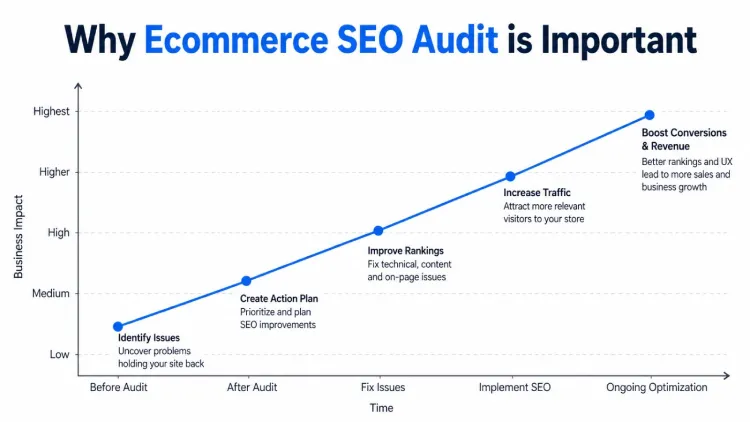
Why Ecommerce SEO Audit is Important
You need a roadmap for your ecommerce store. You may have amazing products, but if you don’t have an effective SEO strategy, you will be missing out.
- Improves search engine rankings: Resolving SEO problems improves your rankings on Google.
- Increases organic traffic: Improves targeting of visitors.
- Boosts conversion rates: Encourages product purchases.
- Identifies hidden errors: An audit can reveal many technical problems.
Need expert help? At Techishweb, we also provide professional ecommerce SEO audit services to optimise your store, fix technical issues, and boost your rankings and sales. Visit our website to get started and take your ecommerce business to the next level.
Ecommerce Technical SEO Audit
Technical SEO is the foundation of your website. Without it, the performance of other strategies is affected.
- Check website speed: Slow sites annoy users and lead to lower rankings. Optimise speed using a tool.
- Ensure mobile-friendliness: Users mostly use mobiles, so your website should be responsive.
- Fix crawl errors: Search engines don’t like dead links or 404s.
- Optimise site structure: Use clear and descriptive URLs and categories.
- Use HTTPS security: People trust, and search engines favour secure sites.
On-Page SEO Audit
On-page SEO aims to improve the individual pages for search and users.
- Optimise title tags: Include primary keyword and keep it brief (less than 60 characters).
- Write compelling meta descriptions: By being compelling, with a bit of keyword love.
- Improve product descriptions: Don’t copy other content, write descriptive titles.
- Use headings (H1, H2, and H3): Organise your content in a user and search engine-friendly way.
- Optimise images: Insert alt text and optimise images to load quickly.
Keyword Research for Ecommerce SEO Audit
Keyword research is fundamental to SEO. If you don’t target the right keywords, your website can’t connect with users.
- Use buyer intent keywords: Words such as “buy,” “best”, and “discount.”
- Target long-tail keywords: They are less competitive and more profitable.
- Analyse competitors: See what keywords they rank for.
- Use keyword variations: Add synonyms and other variations for broader coverage.
Ecommerce Site Content Audit
Content is important for ecommerce SEO. Good content is key to an ecommerce business’s potential.
- Check for duplicate content: Online stores have duplicate content descriptions.
- Improve category pages: Provide information to help the customer make a decision.
- Use blog content: Create guides, tips and reviews to generate traffic.
- Update outdated content: Avoid passing on out-of-date information.
Product Page Optimisation
Product pages convert sales, so make sure they’re well optimised.
- Use high-quality images: Images build trust and give engagement.
- Add detailed descriptions: Describe product features, benefits and uses.
- Include customer reviews: They establish trust and enhance sales.
- Optimise URLs: Make them short and descriptive.
- Add internal links: Link to other products to enhance user experience.
Internal Linking Structure
Internal links assist with website navigation, user experience and search engine optimisation.
- Link related products: Get customers to discover more products.
- Choose meaningful link text: Don’t use phrases such as “click here”.
- Link to products: Increase traffic from blog posts to product pages.
- Keep it organised: Make sure all pages are accessible.
Backlink Audit (Off-Page SEO)
Backlinks are a major ranking factor. Backlink audit evaluates your site’s authority.
- Analyse backlink quality: Consider links from authoritative sites.
- Remove toxic backlinks: Toxic backlinks can hurt your rankings.
- Build new backlinks: Create guest articles, collaborate, and do outreach.
- Monitor competitors: See how they create content and backlinks.
User Experience (UX) Audit
A good user experience affects SEO and conversion. Poor UX can lead to a loss of users.
- Improve navigation: Simplify searches for products.
- Reduce steps to increase sales: Reduce steps to increase sales.
- Include Call-to-Actions (CTAs): direct visitors to buy.
- Ensure fast-loading pages: It impacts SEO and user experience.
E-commerce SEO Audit Tools
The right tools can speed up your e-commerce SEO audit, make it more precise and informed. These tools will assist in identifying technical problems, performance monitoring, and finding opportunities to enhance rankings and revenue.
Google Search Console
Tracks performance and technical SEO problems
- Monitor search performance: View keywords driving traffic, impressions and clicks.
- Identify indexing issues: Identify non-indexed pages, crawl issues.
- Fix coverage errors: Fix broken and redirected pages and server errors.
- Submit sitemaps: Assist in crawling and indexing your site.
Google Analytics
Offers information about user behaviour and traffic
- Track user activity: See how users navigate through your website and what pages are most popular.
- Analyse traffic sources: Understand how visitors find your site (organic, social, referral, etc.)
- Measure conversions: Optimise sales, conversions, and other actions for higher ROI.
- Identify high bounce rate pages: Make improvements to pages with high bounce rates.
Ahrefs or SEMrush
Helps with keyword research and backlinks
- Perform keyword research: Discover low-competition keywords with high search volume for your products.
- Analyse backlinks: Analyse your backlinks and find new link-building opportunities.
- Competitor analysis: Discover competitor keywords and strategies.
- Track keyword rankings: Track the performance of your SEO.
Screaming Frog SEO Spider
Helps find technical SEO problems quickly.
- Crawl your website: Check all pages for issues in one click.
- Detect broken links: Check for 404 errors and get fixes.
- Audit meta tags: Detect missing and duplicate titles and descriptions.
- Analyse site structure: See how your pages are connected.
Bonus Tools for Better Results
- GTmetrix: Analyse website speed and receive suggestions to fix problems.
- Yoast SEO: On-page SEO optimisation for your website.
- Ubersuggest: Find keyword suggestions and basic SEO tips.
Common E-commerce SEO Mistakes
Simple yet critical SEO errors prevent many e-commerce sites from ranking well. Not only do they impact Google rankings, but they also impact user satisfaction and sales. By recognising and resolving them, you can enhance your website’s success.
Duplicate Product Descriptions
Using identical descriptions for the same (or different) products or relying on descriptions from suppliers causes duplication.
- It confuses search engines about which page to show in search results: This could result in reduced visibility or even being completely ignored.
- It reduces your uniqueness: You can differentiate your store from others.
- Solution: Create original and useful descriptions of your products.
Poor Site Structure
If the site structure is confusing, users and search engines have trouble navigating the site.
- Users will have trouble locating products: This leads to higher frustration and drop-off.
- Search engines have crawl problems: The main pages may not get indexed.
- Solution: Organise your site (Home → Category → Product) and use short URLs.
Ignoring Mobile Optimisation
The majority of users access the web via mobile, and mobile SEO is important for web traffic and conversions.
- Poor mobile experience: Users are put off by slow and poor design.
- Lower rankings: Google has mobile-first indexing, so SEO is affected.
- Solution: Responsive design and multiple device testing.
Not Optimising Images
Images are critical for e-commerce websites, but poorly optimised images can hurt SEO.
- Slow page loading speed: Big images increase page load times.
- Missed SEO opportunities: Alt text helps search engines to interpret your images.
- Solution: Optimise images, name them (and the file) accurately, and add alt text with keywords.
Weak Internal Linking
They help pass authority, and user flows within your website
- Poor page authority distribution: Key pages may not always receive optimal SEO.
- Reduced user engagement: Potential visitors may not navigate to other products.
- Solution: Connect related products, pages, and even blog posts.
A lack of content on category pages
Category pages are often overlooked by ecommerce sites or given little content.
- Hard to rank for competitive keywords: Thin pages are less relevant and informative.
- Poor user guidance: Customers don’t see sufficient info on the category.
- Solution: Provide small descriptions, FAQs and keyword content.
Slow Website Speed
First, page speed is an important factor for rankings and affects the user’s experience.
- High bounce rates: Visitors will abandon a site if the page loads too slowly.
- Lower conversions: Even a 1-second increase leads to a loss in sales.
- Solution: Compress images, enable caching and have a fast host.
Missing Meta Tags
Without title tags and meta descriptions, your search rankings can suffer.
- Lower click-through rates: Poor snippets don’t engage users.
- Missed keyword opportunities: Snippets help search engines comprehend pages.
- Solution: Create unique and compelling titles and descriptions.
Not Using Structured Data
Structured data (schema markup) uses microdata to make our content easier to understand.
- Missed rich results: You could miss rich snippets, such as stars and prices.
- Lower visibility: See more products from competitors using schema.
- Solution: Implement product schema, review schema and breadcrumbs.

Ecommerce SEO Audit Checklist
A good ecommerce SEO audit checklist will identify issues that may impact your rankings, traffic or sales. This easy-to-read checklist will help you stay on top.
Technical SEO
- Improve website speed: Reduce bounce rates and increase conversions through improved load times.
- Ensure mobile-friendly design: Your website must be responsive.
- Fix crawl errors: Remove broken links and resolve indexing issues.
On-Page SEO
- Use keywords in the title and meta description: Make content more visible using relevant keywords.
- Use proper headings: Use H1, H2 and H3 for formatting.
- Optimise product pages: Provide a unique description.
Content
- Remove duplicate content: Write unique product descriptions.
- Improve category pages: Include relevant content with keywords.
- Update old content: Provide current information.
Keywords
- Target high-intent keywords: Target what shoppers search for when looking for a product.
- Use long-tail keywords: These bring more targeted traffic.
Backlinks
- Build quality backlinks: Get links from trusted websites.
- Remove toxic links: Avoid spammy backlinks.
User Experience (UX)
- Improve navigation: Make it easy to find products.
- Simplify checkout: Keep it short to boost sales.

Final Thoughts
E-commerce SEO auditing is an ongoing activity. Frequent audits ensure you don’t fall behind and continue to rank well.
Paying attention to technical SEO, content, keywords and user experience will boost your site’s results.
To gain steady traffic and increase your sales, audit your e-commerce website now. The quicker you address any issues, the sooner you can get your website up and running.
Frequently Asked Questions
1. What is an e-commerce SEO audit?
An e-commerce SEO audit is an evaluation of an e-commerce site to identify SEO problems impacting rankings, traffic, and revenue. This audit examines technical, on-page, content, keywords, backlinks and user experience in order to enhance your site’s performance.
2. How frequently should I conduct an e-commerce SEO audit?
Performing a complete e-commerce SEO audit every 3-6 months is recommended. But, for larger or rapidly growing websites, a monthly lightning-fast mini-audit is a good idea to catch problems such as broken links, speed issues, or ranking fluctuations.
3. What are the key takeaways from an e-commerce SEO audit?
The major areas are technical SEO (page speed, responsiveness, site errors), on-page SEO (title and meta tags, product pages), content quality, keyword research, backlink analysis, and user experience (UX). These affect search engine rankings and sales.
4. What tools to use for ecommerce audit?
The most popular ones are Google Search Console (performance and indexability), Google Analytics (user sessions and conversions), Ahrefs or SEMrush (keywords and backlinks) and Screaming Frog (technical SEO errors). These all help you conduct a comprehensive audit.