


The process of making your website faster, more user-friendly, and visually appealing is known as UX/UI performance enhancement to ensure smooth delivery of the experience. An efficient UX/UI lowers bounce rates, enhances engagement, and improves search engine ratings. Conversions and long-term growth can be enhanced greatly by working on speed optimization, human-friendly design, mobile friendliness, and user-centered approaches.
What Is UX/UI Performance Enhancement?
The UX/UI performance enhancement is the act of making a website or an application prompt, effective, beautiful, and user-friendly. It is a blend of both technical performance and human-centered design to bring meaningful interactions.
UX (User Experience)
UX is concerned with the interaction between users and a product and the degree to which the process is comfortable, effective, and enjoyable. It has research, structure, usability, and accessibility. Good UX will guarantee that no time is wasted by users struggling to carry out tasks.
UI (User Interface)
UI is concerned with visual and interactive components of buttons, typography, colors, and layout. It also makes the interface appealing, uniform, and simple to use.
Performance Optimization
- This involves enhancement of the speed of loading, responsiveness, and interactivity. Modern websites require a fast UI and a seamless UX.
The improvement of UX/UI performance cannot be limited to the design but is the offering of speed, clarity, and functionality.
The importance of UX/UI Performance Enhancement
Improvement of UX/UI influences the perception of the users about your site and their interaction process. The interface should be easy (fast and smooth) and user-friendly, enhancing engagement and conversion rates (as well as search engine ranking).
Better User Engagement
As soon as people can open your site with a single click and then browse with ease, they will stick around longer, and you will find more content on your site. Minor delays decrease the engagement considerably.
- The pages load fast,t and users are not lost.
- It is easy to interact with the browsing process and navigate easily.
Higher Conversion Rates
An efficient interface leads the user to such activities as purchasing, registering, or making inquiries.
- Difficulties in decision-making are reduced by clear buttons and calls to action.
- Trust signals and simple forms motivate the users to perform actions.
Improved SEO Rankings
Fast and convenient websites are favored by the search engines. The performance of UX/UI is reflected in such metrics as Core Web Vitals and can affect your rank.
- Speed is optimized, and responsive design enhances the visibility.
- More precise interactions,s such as reduced bouncing rates, are helpful to SEO.
Reduced Bounce Rate
Delayed and incomprehensible websites send away clients. The presence of a smooth flow keeps the visitors interested.
- The frustration is eliminated by the ease of navigation and legible content.
- A fast connection makes it impossible to be abandoned.
Mobile-Friendly Experience
As a majority of users use mobile devices, a responsive and optimized UI is needed.
- Designs can be changed to any size of the screen.
- Media are optimized and have touch-friendly buttons.
Main UX/UI Performance Improvement Factors
To have an efficient UX/UI performance improvement, several fundamental components should interoperate:
Website Speed Optimization
Quick page loads make the users interested. Image optimization, code optimization, and caching can be used to enhance performance.
Responsive Design
It should responsively support any size of the screen and provide the user with a comparable experience on a tablet, mobile, and desktop.
Easy and Uncluttered Design
Minimalist design eliminates complexity, enhances readability, and assists users in concentrating on the important activities.
Interactive Elements
Animations, transitions, and smooth buttons make the site easier to use without reducing its speed.
Accessibility Improvements
Make things accessible to everybody by making fonts readable and including sufficient contrast and key-navigability.
The combination of these factors makes a site faster, easier to use, and look at.
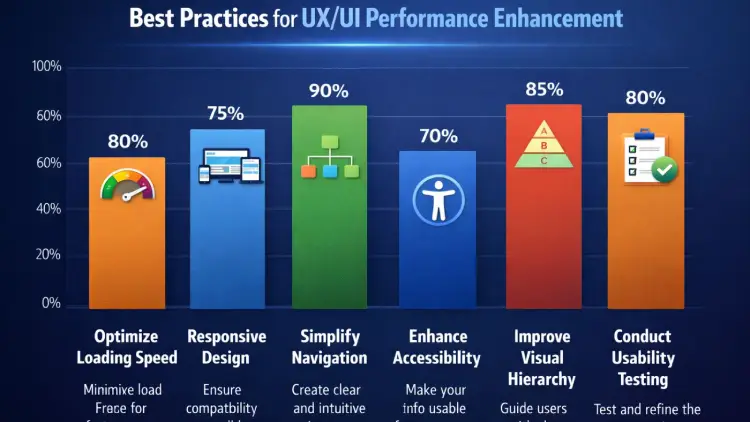
Best Practices for UX/UI Performance Enhancement
- The use of the best strategies can make a great difference in terms of UX/UI performance improvement.
1. Optimize Website Speed
Compress Images
- Modern formats such as WebP can be used to block file sizes and increase quality.
Minify Code
- The elimination of redundant CSS, HTML, and JavaScript enhances loading speed.
Use CDN
- The Content Delivery Networks reproduce the data around the world; this minimizes latency.
Enable Caching
- Surely, Browser caching is the local storage of resources due to repeated visits.
2. Improve Mobile Responsiveness
Mobile-First Design
- Mobile design guarantees performance on all devices.
Flexible Layouts
- Have reactive grids and scalable components.
Touch Optimization
- The buttons must be simple to tap and large.
3. Improve Navigability and Usability.
Simple Navigation Structure
- Users are to find anything they need in several clicks.
Clear CTAs
- The buttons of the call-to-action should be prominent and user-friendly.
Search Functionality
- Search engine is efficient and is considered for usability, particularly in the case of large websites.
4. Be Consistent with Design Elements.
Typography
- Readability is enhanced by uniform fonts.
Color System (60-30-10 Rule)
- According to this popular UI rule, one should try to use:
60% primary color
- 30% secondary color
10% accent color
- This brings out visual harmony and enhances the beauty.
Design Patterns
- Recurring designs enable easy navigation for the users.
5. Optimize User Interaction
Fast Response Time
- Real-time actions such as clicks and submitting a form should not take time.
Microinteractions
- Dynamisms serve to enhance interest, even minor effects (i.e., hover effects).
- Do not use too many Animations.
- Intensive animations slow down the speed and distract people.
Boost Your Website’s UX/UI Today!
Looking to make your website faster, more engaging, and mobile-friendly? At TechishWeb, we provide expert UX/UI performance enhancement services that improve speed, usability, and conversions. Get in touch now and take your website to the next level!
UX/UI Performance Enhancement Tools
The enhancement of UX/UI performance requires the use of appropriate tools. These assist you in examining speed, analyzing user behavior, and creating improved interfaces.
Google PageSpeed Insights
Helps assess the speed of the websites and gives recommendations on how to make them better in terms of performance and Core Web Vitals.
Lighthouse
Run a performance, accessibility, and SEO audit of your website and receive clear recommendations for improvement.
GTmetrix
Provides clear-cut reports on page load times and indicates the problems that influence the enhancement of UX/UI.
Hotjar
Gives heat maps and recordings of live sessions to know how your customers navigate your site.
Figma / Adobe XD
Useful technology in designing UI, creating wireframes, and programming prototypes.
AI Tools (Modern Enhancement)
Figma AI, Uizard, or Adobe Firefly are the tools that allow designing and making the workflow more efficient.
The combination of these tools can be a very effective contributor to the UX/UI performance and the user experience on the whole.
Top Ten UX/UI Design Conventions
It is equally important to avoid making mistakes as well as to apply the best practice.
Slow Loading Pages
It is one of the main causes of abandonment by the user.
Cluttered Design
There are too many components that clutter users and confuse them.
Poor Mobile Optimization
Negligence towards mobile users causes loss of traffic.
Confusing Navigation
Detailed menus irritate users.
Bad UX Example
The typical bad UX is a site that pops up and prevents access to information, loads slowly, has poorly defined buttons, and has complicated navigation.
The role of UX/UI Performance on SEO
The improvement of the UX/UI is a significant part of the search engine ranking. Google and other search engines are bound to give higher priority to those websites that display quick, slick, and easy-to-use services. When online users engage with your site positively, it creates good indications that people consider your content useful and relevant.
Core Web Vitals
Core Web Vitals are the major performance indicators applied by Google to indicate the user experience. They are Largest Contentful Paint (LCP), which is the indicator of the speed of loading First Input Delay (FID), which monitors the interactivity and Cumulative Layout Shift (CLS), which is the visual stability indicator. The metrics have to be optimized by improving the UX/UI performance to get your site to load fast, make the performance real-time, and have a consistent layout, which will improve your rankings.
User Behavior Signals
The search engines interpret the behavior of users on your site. When visitors can spend more time, engage in content, and navigate several pages, this is a sign that the visitors have a positive experience. Conversely, the bounce rate is high, and there is low engagement, which indicates poor UX. The UX/UI performance improvement by making navigation, design clarity, and speed higher contributes to dwell time increase and bounce reduction, which boosts SEO.
Mobile-First Indexing
Using the mobile version of your site is the new foundation of ranking used by Google. That is, your mobile UX/UI has to be quick, responsive, and usable. In case your site is not optimized for mobile devices, then your rankings will be affected. Performance enhancement in UX/UI would make sure layouts change accordingly, buttons are easy to touch, and make content readable in any screen size.
Page Experience Signals
Pop-ups that are not intrusive, the use of HTTPS security, and mobile-friendliness, among other factors, make up the page experience. With the optimized UI and smooth UX, a secure and pleasant experience of browsing is achieved. The improvement of UX/UI allows you to meet the standards and make your site more reliable and search engine optimized.
Site Speed and Crawl Efficiency
The search engine bots find it easier to crawl and index faster websites. Slowness in loading your pages could cause search engines to fail to complete the indexing of your pages. Speed optimization by UX/UI performance optimization optimizes crawling and makes sure that your pages are ranked well.
Structure and Content Access
Easy-to-read fonts, clean UI with good headings, spacing between headings, and content make the content easier to comprehend among the users and search engines. Good UX also guarantees that critical information can be readily available,e thereby enhancing indexing and ranking.
Altogether, the improvement of UX/UI is not only a design issue, as it has a direct impact on the search engine ranking of your site. A quick, responsive, and easy-to-use site will result in higher ranking, more traffic, and more online presence.
Future trends of performance enhancement of UX/UI
The future of the UX/UI performance is changing at an alarming pace with technology.
AI in UX/UI
AI is not eliminating designers but improving workflow. It helps with setups, testing, and customization.
Voice Interfaces (VUI)
- Interactions over voice are gaining acceptance.
- Augmented Reality (AR)
- AR improves e-commerce and applications user experience.
Minimalism
- Clear and noise-free interfaces are in fashion.
- Personalization
- Sophisticated personalized AI experiences.
Expert-level UX/UI Concepts and Principles
The knowledge of further UX/UI principles enhances UX/UI performance.
80/20 Rule (Pareto Principle)
The same 20 per cent of users dwell on 80 per cent of the features. Prioritize key functionalities.
3-Second Rule
It takes users an impression in 3 seconds. Delays and sluggishness of the UI send them away.
3-30-3 Rule
- First 3 seconds- grab attention.
- 30 seconds: interact with the user.
- 3 minutes: translate or memorize.
4 Types of UI
- Graphical UI (GUI)
- Voice UI (VUI)
- Menu-driven UI
- Command-line UI
4 Pillars of UX/UI
- Usability
- Accessibility
- Performance
- Design consistency
Processes and frameworks of UX/UI Design
Powerful architectures promote the enhancement of UX/UI performance.
There are 11 phases of UX design
- Research
- Design
- Testing
- Implementation
- 6D UX Process
- Discover
- Define
- Design
- Develop
- Deploy
- Drive
4 UX Frameworks
- Design Thinking
- Lean UX
- Double Diamond
- Agile UX
5 Ingredients of UX
- Strategy
- Scope
- Structure
- Skeleton
- Surface
The 13 Principles of UX Design
- Useful
- Usabl
- Desirable
- Findable
- Accessible
- Credible
- Valuable
- 5S of UX
- Strategy
- Structure
- Skeleton
- Surface
- Style
UI Design Golden Rules
UI designs have established design principles.
7 Golden Rules of UI.
- Consistency
- Feedback
- Efficiency
- Error prevention
- Flexibility
- Simplicity
- User control
How to design a good UI- 4 golden rules
- Clarity
- Consistency
- Feedback
- Simplicity
Career, Learning, and Industry Insights
Increased UX/UI performance is inextricably associated with professional development and changing trends in a particular industry. The need for talented designers is on the increase as companies give more attention to digital experience.
Is UX/UI Stressful
It may be difficult because of a deadline and revision,s but experience and appropriate workflow make it possible and worth it.
Is UX a Lot of Coding
UX primarily incorporates research and design, whereas the basic front-end knowledge may be needed in UI. There is no need for heavy coding.
Are Jobs in UX Slowing
No, demand is up because companies place more money in UX/UI performance improvement in order to enhance user satisfaction and conversions.
You Can Learn UX/UI in 3 Days
The fundamentals can be mastered in a short span of time, although mastering them takes time and practical work on a real project.
UX vs. CX (Customer Experience)
The UX is centered on the interaction with the product, whereas the CX is the entire experience of the customer. They both collaborate in order to achieve improved outcomes.
Is AI Crowding out UX/UI
No, AI helps to simplify the work of designers and automate some functions, although human imagination and choice should not be neglected.
What are the best AI Tools that can be used in UI/UX
- Figma AI, Uizard, and Adobe Firefly are some of the tools used in the acceleration of design and enhancing efficiency.
- In sum, the improvement of the UX/UI functionality provides good career prospects along with long-term prospects of the digital sector.

Conclusion
Enhancements of UX and UI are one of the most important aspects of creating an effective online presence. Through speed, usability, and design, businesses are able to offer better user experiences, become more engaging, and increase conversions.
The work of maximizing UX/UI is a continuous task, both through the application of the 80/20 rule and 60-30-10 color balance, and the use of modern tools and AI. As a beginner or an experienced professional, paying attention to the improvement of the UX/UI performance will make you remain competitive and reach long-term success.
Frequently Asked Questions
1. What is the performance enhancement of UX/UI, and what is its significance?
The process of enhancing website performance, which is speed, ease of use, and design to produce a seamless user experience, is known as UX/UI performance enhancement. It is significant as it facilitates the decrease of bounce rates, enhances user interest, raises SEO positions, and improves conversions.
2. What can I do to enhance the UX/UI of my site?
Enhancement of UX/UI performance can be done through optimization of page speed, responsive design, simplification, mobile usability, and fast loading. Issues can also be detected using such tools as PageSpeed Insights and Lighthouse.
3. Does the UX/UI performance influence the SEO ranking?
Yes, the UX/UI performance improvement is directly related to SEO. Such considerations as Core Web Vitals, mobile-friendliness, page speed, and user interaction are all search engine ranking factors.
4. Is UX/UI a promising profession in the future?
Yes, UX/UI is a booming industry that is in demand. With UX/UI performance improvement being actively invested in businesses, career opportunities with significant perspectives to grow in the long term are available, in particular for crafty designers, who will stay in touch with the contemporary tools and trends.