
AI helps small businesses save time, automate tasks, and boost productivity. It manages customer support, marketing, sales, and data analysis, letting teams focus on growth. By starting small, gradually integrating tools, and training your team, businesses can scale efficiently. AI also improves customer engagement, provides data-driven insights, and reduces costs, helping small businesses grow smarter and stay competitive.
What is AI for Small Business?
AI for small businesses uses artificial intelligence to automate tasks, improve efficiency, and enhance decision-making. It mimics human intelligence for information processing, pattern recognition, and problem-solving.
Key Uses:
- Task Automation: Scheduling, emails, reminders, and routine workflows.
- Customer Service: AI chatbots (like Agentforce) provide 24/7 support.
- Marketing: Generative AI creates personalised campaigns and content.
- Operations: Inventory, sales, and workflow optimisation.
- IT Support: AI monitors systems and prevents technical issues.
Even small teams with limited IT resources can boost productivity, reduce costs, and provide better customer experiences. AI helps SMBs work smarter, compete with larger companies, and scale efficiently without adding complexity.
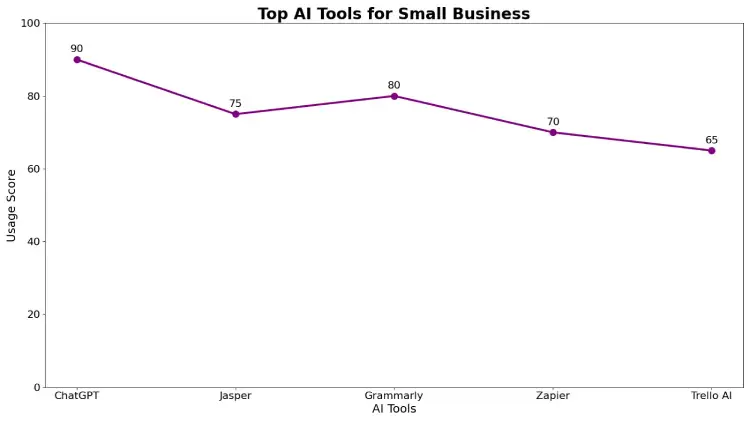
Top AI Tools for Small Business
Implementing the right AI tools can make a huge difference in the efficiency, productivity, and growth of a small business. Here’s a breakdown of some of the best AI tools across key business areas:
1. Marketing
- HubSpot AI: Helps automate marketing campaigns, manage contacts, and generate personalised emails for better customer engagement.
- Jasper AI: An AI-powered content creation tool that can write blog posts, social media content, and ad copy in minutes.
- Canva AI: Makes designing marketing materials easy with AI-generated templates, graphics, and image suggestions.
2. Customer Service
- Tidio AI: An AI chatbot that provides instant support, answers FAQs, and improves customer engagement on websites.
- Zendesk AI: Enhances customer service by automating ticket responses, analysing customer queries, and providing actionable insights.
3. Sales & Leads
- Clay: Organises contact information and automates outreach, making lead management smarter and more efficient.
- Pipedrive AI: AI-powered CRM that predicts sales trends, prioritises leads, and helps sales teams close deals faster.
4. Analytics
- Google Analytics 4 + AI: Provides data-driven insights, predicts trends, and helps optimise marketing strategies.
- DataRobot: An advanced AI platform that analyses data, builds predictive models, and helps make smarter business decisions.
5. Workflow & Productivity
- Zapier AI: Automates repetitive tasks across apps and platforms, such as notifications, data entry, and reporting.
- Monday.com AI: Enhances project management with AI features like task prioritisation, workflow automation, and progress tracking.
In summary: Using these AI tools, small businesses can save time, reduce costs, improve decision-making, and enhance customer experiences—all while staying competitive in a fast-paced market.
“Want to implement these AI tools for your business? At TechishWeb, we offer expert AI integration services to boost productivity, automate workflows, and grow your business efficiently. Get Started Today.
How to Implement
- Start with one or two tools to solve key challenges.
- Integrate with existing systems gradually.
- Train your team on AI use.
- Track performance and optimise continuously.
Tip: Use AI to scale your business while maintaining the personal touch that makes small businesses unique.
Why Small Businesses Should Embrace AI
AI helps small businesses improve customer service, save time, and boost loyalty. Research shows 48% of SMBs see significant improvements in customer experience after adopting AI tools.
Key Benefits:
- Faster responses: AI chatbots answer questions instantly across email, chat, and social media.
- Smarter AI agents: Machine learning allows AI to learn from interactions, improving over time.
- Personalisation: Integrated with CRM, AI can analyse customer behaviour and deliver tailored offers and messages, enhancing loyalty.
- Efficiency: Automates repetitive tasks, freeing staff for higher-value work.
By using AI, SMBs can deliver faster, personalised service, build stronger relationships, and operate more efficiently—even with small teams.
Increased Productivity with AI
One of the most powerful benefits of AI for small businesses is increased productivity. According to a survey by the Small Business and Entrepreneurship Council (SBE), 76% of small business owners report that AI enables them to focus on high-value tasks such as developing new products, creating targeted marketing campaigns, and improving overall business strategy.
How AI Boosts Productivity
AI achieves productivity gains primarily by automating manual and repetitive tasks, allowing teams to dedicate more time to strategic initiatives that drive growth. Some examples include:
- Data Collection and Verification
- Traditionally, employees spend hours entering customer information into databases and checking for errors.
- AI tools can automate data entry, verification, and updates, drastically reducing human error and freeing up staff to focus on analysis and decision-making.
- Traditionally, employees spend hours entering customer information into databases and checking for errors.
- Administrative Tasks
- Scheduling, invoice processing, email triaging, and other routine tasks can be handled by AI assistants, reducing time spent on repetitive work.
- Scheduling, invoice processing, email triaging, and other routine tasks can be handled by AI assistants, reducing time spent on repetitive work.
- Marketing and Sales Support
- AI can generate personalised email campaigns, optimise ad targeting, and suggest sales leads, streamlining marketing efforts and increasing ROI.
Real-World Example
Consider a small eCommerce business:
- Before AI, the team spent hours entering customer details, checking for duplicates, and updating records.
- With AI-powered automation, customer data is captured, verified, and organised automatically, allowing the team to focus on promoting products, improving user experience, and increasing sales.
The Outcome
By automating routine tasks, AI allows small businesses to:
- Increase operational efficiency
- Reduce errors and rework
- Focus on growth-driven initiatives
- Achieve more with smaller teams
In essence, AI doesn’t just speed up workflows—it empowers small businesses to allocate their time and resources more strategically, driving higher productivity and long-term success.
Reduced Costs with AI
AI helps small businesses cut operational costs by automating routine tasks like data entry, customer inquiries, appointment scheduling, and follow-ups. It also handles large-scale data analysis efficiently, working around the clock with fewer errors and delivering precise insights.
By reducing human error and minimising the need for extra staff, AI allows SMBs to save money, improve efficiency, and focus on strategic growth.
Better Marketing Content with AI
One of the most transformative benefits of AI for small businesses is its ability to enhance marketing content creation. Thanks to generative AI (GenAI), SMBs can now produce high-quality marketing, sales, product, and blog content faster and more efficiently than ever before.
How Generative AI Works
Generative AI combines large language models (LLMs) with natural language processing (NLP) to understand, interpret, and generate human-like text. This allows AI to:
- Respond to questions or prompts
- Generate drafts for emails, social media posts, or blog articles
- Suggest new marketing ideas or topics
- Create product descriptions and promotional content
By leveraging these capabilities, small businesses can reduce the time and resources required to produce content while maintaining consistent messaging across multiple channels.
Practical Applications for SMBs
- Email Marketing
- AI can draft personalised email campaigns, suggest subject lines, and even optimise send times for better engagement.
- AI can draft personalised email campaigns, suggest subject lines, and even optimise send times for better engagement.
- Content Generation
- Businesses can use AI to generate blog topics, create social media captions, or produce product descriptions quickly, freeing human teams to focus on strategy and creativity.
- Businesses can use AI to generate blog topics, create social media captions, or produce product descriptions quickly, freeing human teams to focus on strategy and creativity.
- Operational Support
- Beyond marketing, AI-generated content can also assist with internal communications, documentation, and reports, streamlining business operations.
Important Considerations
While generative AI is powerful, there are limitations to be aware of:
- Best for simple and standardised tasks: AI excels at repetitive, structured content but struggles with nuanced or highly creative material.
- Avoid overuse: Relying solely on AI can lead to formulaic or repetitive content, which may reduce customer engagement.
- Human oversight is crucial: To maintain a unique brand voice, humans should review and refine AI-generated content.
The Bottom Line
Generative AI allows SMBs to produce content faster, scale marketing efforts, and reduce workload, while still leaving room for human creativity and oversight. When used strategically, it helps small businesses maintain a strong online presence, engage customers more effectively, and compete with larger enterprises in content-driven marketing.
The Guide to AI for Small Business
For small businesses looking to leverage artificial intelligence (AI), this free guide provides comprehensive tips, strategies, and tools to help you implement AI effectively. The guide is designed to help businesses of all sizes, industries, and regions make informed decisions about adopting AI solutions.
Who Can Benefit
The guide is tailored to businesses of varying sizes:
- 1–20 employees – Perfect for startups or micro-businesses looking to automate essential operations without a dedicated IT team.
- 21–200 employees – Ideal for growing businesses that need scalable AI solutions for marketing, sales, customer support, and operations.
- 201–10,000 employees – For medium-to-large businesses that require integrated AI systems to manage multiple teams and processes efficiently.
- 10,001+ employees – Enterprise-level businesses looking for advanced AI analytics, automation, and workflow optimisation.
Industry-Specific Insights
AI can benefit almost any industry. The guide covers tailored strategies for:
- Automotive – AI in supply chain management, predictive maintenance, and customer service.
- Financial Services – Fraud detection, automated reporting, and personalised banking experiences.
- Healthcare – Patient data analysis, appointment scheduling, and virtual assistants.
- Retail & Consumer Goods – Personalised recommendations, inventory optimisation, and marketing automation.
- Tech, Education, Media, Nonprofit, Public Sector, Energy & Utilities, Manufacturing, Life Sciences, Communications, and Other Industries – Each industry section highlights AI use cases specific to operational needs, marketing, and customer engagement.
Regional Relevance
The guide also takes into account geographic considerations, offering strategies suitable for businesses around the world. It includes country-specific examples and regulations for:
- United States, United Kingdom, Canada, Australia, India, Pakistan, and other major regions
- Smaller nations and territories where AI adoption may face unique challenges
This allows businesses to implement AI solutions that are compliant, efficient, and culturally relevant to their markets.
What You’ll Learn
By downloading the free guide, you’ll gain actionable insights on:
- Selecting the right AI tools for your business size and industry
- Step-by-step strategies for AI adoption
- Tips to integrate AI into marketing, operations, customer support, and sales
- Ways to measure AI ROI and maximise efficiency
The guide is perfect for any small business looking to scale, automate, and compete effectively in 2025 and beyond.
How to Access
To get the free guide, select your business size, industry, and country/region from the dropdown menus, and the guide will provide customised recommendations for AI tools and strategies. Your privacy is protected, and data is handled securely.
Best Practices for Implementing AI in Small Businesses
AI works best when it augments existing processes. To implement it successfully, SMBs should:
- Define Use Cases – Identify specific challenges where AI can add value, such as automating tasks, improving customer service, or analysing sales data. Avoid adopting AI just because others are doing it.
- Consider Pain Points – Ensure AI integrates smoothly with existing systems. Use APIs for legacy or custom-built software to prevent errors and data loss.
- Train Your Team – Educate employees on AI functions, workflows, and responsible handling of customer data.
- Monitor Continuously – Track AI performance, gather feedback, and adjust workflows to optimise results.
By following these steps, small businesses can maximise ROI, improve efficiency, and ensure smooth adoption of AI tools.
Challenges in Adopting AI for Small Businesses
While AI brings many benefits, small businesses face data security and standardisation challenges.
- Data Security: AI relies on customer data for personalisation, but breaches can harm trust. SMBs must encrypt and anonymise data, follow regulations like GDPR and CCPA, and implement strong governance.
- Standardisation: The AI market is fragmented, with varying data-handling practices. SMBs should choose compliant, transparent AI providers to reduce risks and ensure consistent operations.
By addressing these challenges, small businesses can safely adopt AI, protect customer data, and leverage AI tools effectively.
Salesforce AI for Small Business
Salesforce offers a suite of AI-powered tools designed specifically for small businesses, helping teams work smarter, automate repetitive tasks, and make data-driven decisions without needing heavy technical expertise. These tools integrate with Salesforce’s ecosystem, giving SMBs access to advanced AI capabilities in sales, service, marketing, and team collaboration.
1. Agentforce 360
Agentforce 360 is an all-in-one digital assistant that acts as a “smart agent layer” across your business. It allows small businesses to build, customise, and deploy AI agents for sales, customer service, and other operations without coding.
Key features include:
- Agentforce Builder: Quickly create AI agents to handle tasks such as responding to customer queries, managing appointments, or guiding internal workflows.
- Agentforce Voice: Conduct realistic phone and chat conversations with customers, giving the impression of a live agent while automating routine interactions.
- Intelligent Context: Connect agents to your company’s real data sources—like CRM records, PDFs, and images—so they provide accurate, context-aware responses.
With Agentforce 360, small businesses can streamline operations, improve customer interactions, and reduce workload on staff while maintaining a ppersonalisedtouch
2. Customer 360 Apps
Salesforce’s Customer 360 applications are now fully Agentforce-ready, meaning AI agents are integrated directly into sales, service, and other workflows. These AI-powered agents:
- Assist sales agents in identifying opportunities and following up with leads
- Help service agents provide faster, more accurate customer support
- Support healthcare, retail, and other industry-specific workflows
These agents use the Atlas Reasoning Engine, which balances creative AI outputs with structured business logic, ensuring reliable automation and actionable insights. By integrating AI into existing Customer 360 apps, SMBs gain:
- Smarter workflow automation
- Data-driven insights for better decision-making
- Enhanced operational efficiency without needing additional technical staff
3. Slack AI
Slack AI is designed to enhance team collaboration and productivity by automating communication and summarisation tasks within Slack channels. Features include:
- Conversation Summaries: Quickly capture key points from long discussions
- Action Items: Automatically identify and assign follow-up tasks
- Message Drafting: Generate professional messages or replies
- File Surfacing: Suggest relevant documents or resources based on context
Slack AI integrates with Salesforce data in real time, allowing sales, service, and marketing teams to act faster and more effectively. For example, a customer support agent can immediately access CRM data, resolve queries, and document actions—all without leaving Slack.
Why Salesforce AI Works for Small Businesses
Salesforce AI tools are ideal for SMBs because they:
- Require minimal coding knowledge, making implementation accessible
- Integrate seamlessly with existing CRM and collaboration platforms
- Automate repetitive tasks, freeing staff to focus on strategic work
- Provide data-driven insights for smarter decision-making
- Enhance customer interactions, making small teams more effective
By leveraging Agentforce 360, Customer 360 Apps, and Slack AI, small businesses can scale operations efficiently, improve customer service, and empower employees to focus on high-value activities.
AI-Powered Customer Resolution
AI-powered customer support goes beyond traditional chatbots by understanding context, analysing intent, and providing personalised responses. Unlike static preprogrammed answers, AI can access CRM data and past interactions to deliver accurate, relevant solutions.
Benefits for SMBs:
- Faster, more satisfying customer responses
- Frees human agents for complex tasks
- 24/7 scalable support
- Continuous improvement through machine learning
For example, an AI agent can check an order’s status and provide a personalised update, improving customer experience and loyalty while reducing support workload.
Human Oversight in AI Automation
AI can handle complex tasks and automate workflows, but human oversight is essential. People review AI outputs, provide feedback, and correct errors, ensuring accuracy, ethical use, and alignment with business goals.
With self-learning capabilities, AI improves over time, but humans remain the ultimate quality control. Combining AI automation with human guidance allows businesses to boost efficiency, reduce mistakes, and continuously improve performance.
Top AI Solutions for Business Operations
AI can streamline tasks, improve productivity, and provide actionable insights for small to medium businesses. Here are some top AI tools in 2026:
- Lindy – AI Executive Assistant: Automates calls, emails, meetings, and customer support. Integrates with Gmail, Slack, CRMs, and more. Ideal for SMB founders and operations leaders.
- ThoughtSpot – Business Analytics: Provides AI-driven insights with natural language search and interactive dashboards. Perfect for analysts, executives, and data teams.
- Microsoft Copilot – Productivity Automation: Automates repetitive tasks across Office apps and workflows to save time.
- Zapier AI – Workflow Automation: Connects apps and automates processes without coding.
- Workstatus – Workforce Productivity Tracking: Monitors team performance and time management efficiently.
- Nyota – Meeting Automation: Schedules and manages meetings automatically.
- Spinach AI – Meeting Summaries & Action Items: Generates notes, tasks, and follow-ups from meetings.
- Clay – Sales & Marketing Data Enrichment: Enriches customer and prospect data for targeted campaigns.
- Tidio AI – Customer Engagement Chatbot: Automates customer support and engagement via chat.
- DataRobot – Automated Machine Learning & Insights: Delivers predictive analytics and data-driven business decisions.
Summary:
These AI tools help SMBs save time, reduce manual work, improve customer experience, and make smarter business decisions—all while scaling efficiently without expanding teams.
Microsoft Copilot: Best AI for Productivity Automation
What It Does:
Microsoft Copilot is an AI-powered productivity assistant embedded within Microsoft 365 apps. It helps teams automate workflows, generate content, analyse data, and enhance collaboration, all within familiar tools like Word, Excel, PowerPoint, Outlook, and Teams.
Who It’s For:
- Microsoft 365 users
- Teams seeking seamless AI integration into daily productivity software
- Businesses aiming to reduce repetitive tasks and improve workflow efficiency
Key Features
- AI-Enhanced Content Creation
- Chat and Create Modules: Generate documents, presentations, or reports directly inside Office apps.
- Copilot Notebooks: Organise content and combine AI-generated insights for projects
- Embedded Media: Add images and files into documents automatically
- Advanced Reasoning Agents
- Researcher Agent: Performs in-depth data analysis to extract key insights
- Analyst Agent: Automates complex workflows and generates actionable recommendations
- Data-Driven Decisions: Analyse large datasets without leaving Microsoft 365
- Collaboration Improvements
- Meeting Summaries: AI summarises Teams meetings, highlighting key points and action items
- Inbox Prioritisation: AI helps manage emails and flag important messages
- File Handling: Upload large files, annotate, and integrate content into shared documents
- Customisation and Control
- Copilot Studio: Build low-code, custom AI agents tailored to your organisation’s workflows
- IT Admin Controls: Manage security, access, and compliance for AI use across teams
Benefits for Small and Medium Businesses
- Boosts Productivity: Reduces time spent on repetitive tasks, allowing employees to focus on strategy, creativity, and high-value work
- Streamlines Collaboration: Enhances team communication, project organisation, and document management
- Accessible to Teams: Since it’s integrated into Microsoft 365, adoption is seamless for users already familiar with the platform.
- Customizable Workflows: Businesses can tailor AI tools to specific processes without heavy coding
Pros
- Deep integration across Microsoft 365 apps
- Powerful reasoning agents for research, data analysis, and workflow automation
- Smarter collaboration tools for Teams, Outlook, and Office apps
Cons
- Requires a Microsoft 365 subscription
- Advanced features are still rolling out and may require a learning curve
Pricing
- Microsoft 365 Copilot: $30 per user/month
Includes workflow automation, custom agent building, actionable insights, and enterprise-grade security
Summary:
Microsoft Copilot is ideal for businesses already using Microsoft 365, providing AI-driven productivity and collaboration tools that save time, reduce errors, and streamline workflows. It combines content creation, data analysis, and task automation into one integrated AI platform, making it one of the most accessible and powerful AI solutions for business operations.

Final Thought
AI lets small businesses automate tasks, boost productivity, and scale efficiently. Tools like Lindy, Microsoft Copilot, and Salesforce Agentforce help save time, reduce costs, and improve customer experiences. With smart implementation and human oversight, AI amplifies your team’s capabilities and drives growth.
Frequently Asked Questions
1. Why use AI for small businesses?
AI automates tasks, saves time, reduces costs, and improves customer service.
2. Which AI tools are best?
Lindy, Microsoft Copilot, Salesforce Agentforce 360, ThoughtSpot, and Zapier AI.
3. How to implement AI?
Start small, integrate gradually, train your team, and monitor results.
4. Can AI help with marketing content?
Yes, it creates emails, social posts, and blogs faster—but human oversight is needed.