


The high-performing website has technical SEO as its base. By optimising site speed, structure, crawlability, and indexing, it ensures search engines understand your content clearly. Mastering Technical SEO boosts your rankings, increases organic traffic, and drives measurable growth, making your website more visible, trustworthy, and successful online.
What is Technical SEO
Technical SEO is the process of optimising a website’s technical elements to improve its visibility and performance in search engine results pages (SERPs). Unlike on-page SEO (content) or off-page SEO (backlinks), technical SEO focuses on the behind-the-scenes aspects that help search engines crawl, index, and rank your site effectively.
Key aspects include:
- Crawlability & Indexing: Ensuring search engines can find and index your pages through sitemaps and robots.txt.
- Speed / Performance of the sites: Optimisation of the load times, compression, and the use of the CDN.
- Mobile-Friendliness: Making your site responsive for all devices.
- Security (HTTPS): Using SSL to make your website secure.
- Rich results: Rich schema to add to search results.
- URLs and Canonicalization: Generation of clean URLs and prevention of redundancy of content.
- Fixing Errors: Resolving broken links and server issues.
- Site Architecture: Organising content and internal links for easy navigation.
Importance of Technical SEO
Technical SEO is essential for improving a website’s performance, visibility, and user experience. It ensures search engines can crawl, index, and rank your pages effectively, while providing a smooth and secure experience for visitors.
Key benefits include:
- Better Crawling and Indexing: will assist search engines in locating and comprehending your pages.
- Better User Experience: Fast, mobile-friendly sites reduce bounce rates and boost engagement.
- Higher Rankings: Optimised technical elements like speed, security, and structure improve SERP positions.
- Prevention of Duplicate Content: Canonical tags and redirects ensure the correct pages are indexed.
- Fine-tuning Data and Rich Snippets: Schema markup amplifies the search result and the click-through rates.
- Website Security ( HTTPS): Protects user information and earns the confidence of people.
- Navigation: Collection tasks and Unique URLs: simplicity of design makes it easier to use and understand by search engines.
- Adaptation to Algorithm Changes: Technically sound sites handle updates better.
Competitive Advantage: Well-optimised sites outperform competitors in rankings and engagement.
Why it matters: A Techisweb optimised website ensures search engines can understand and rank your content, improves user experience, and boosts organic traffic.
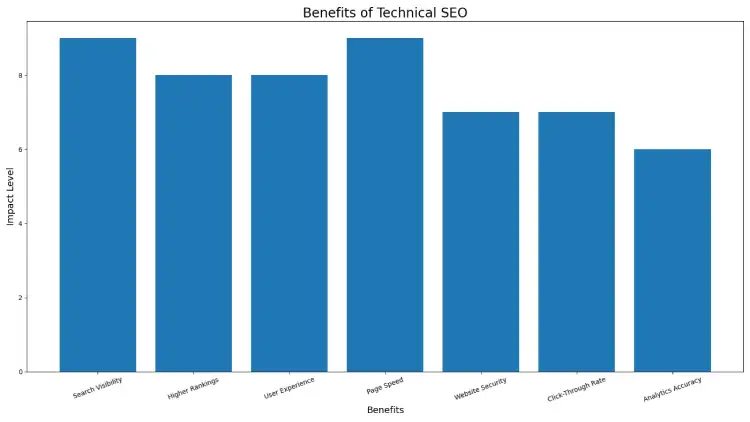
Benefits of Technical SEO
Technical SEO improves a website’s performance, visibility, and user experience, forming the foundation for effective SEO. Key benefits include:
- Improved Search Engine Visibility: Ensures search engines can crawl, index, and understand your content.
- Higher Rankings: Optimised site speed, mobile-friendliness, and URLs boost rankings and organic traffic.
- Improved User Experience: Rapid websites which are responsive minimise the bounce time and boost engagement.
- Prevention of Duplicate Content: Canonical tags and proper redirects ensure the correct pages are indexed.
- Better Click-Through Rates: Structured data and rich snippets make search listings more attractive.
- Secure Website (HTTPS): Protects user data and builds trust, improving rankings.
- Adaptability to Algorithm Changes: Technically optimised sites adjust better to search engine updates.
- Competitive Advantage: Well-optimised websites outperform competitors in traffic, engagement, and conversions.
- Faster Page Load Times: Improves user experience and search rankings.
- Accurate Analytics Insights: Proper setup allows better tracking of user behaviour and website performance.
In short: Technical SEO strengthens your website’s foundation, helping it rank higher, provide a better user experience, and achieve long-term growth.
1. Use the Right SEO Tool
The first step in technical SEO is using the right tools to analyse and optimise your website. All In One SEO (AIOSEO) is one of the strongest and easiest to use ones for users of WordPress.
Why AIOSEO is essential:
- Cornerstone Content: Helps you create topic clusters, boosting your topical authority and semantic SEO strategy.
- Author SEO: Supports Google’s E-E-A-T (Expertise, Authoritativeness, Trustworthiness) by highlighting your author bio correctly.
- Search Statistics: Integrates with Google Search Console to track keyword rankings, clicks, and impressions in a single dashboard.
- SEO Revisions: Tracks all changes made on your website and shows their impact on rankings over time.
- Advanced Robots.txt Generator: Easily create and customise your robots.txt file for better crawling and indexing.
- TruSEO Highlighter: Detects on-page SEO issues and provides actionable recommendations.
- Next-Gen Schema Generator: A no-code solution for creating structured data to enhance rich snippets in search results.
- Link Assistant: Automates internal linking, audits outbound links, and improves site structure.
- SEO Preview: Displays the visual of your pages in search and social snippets to maximise clicks to the site.
Using a robust SEO tool like AIOSEO simplifies technical SEO, making it accessible even for beginners, and ensures your website is optimised according to best practices.
Core Web Vitals
Core Web Vitals are Google’s key metrics for measuring user experience on a web page. They focus on loading speed, responsiveness, and visual stability, all of which affect SEO rankings.
The three main metrics:
- Largest Contentful Paint (LCP): Measures page load speed. The LCP is recommended to take place in 2.5 seconds by Google. Optimise images, videos, and reduce render-blocking scripts to improve it.
- Interaction to Next Paint (INP): Measures responsiveness to user actions like clicks or scrolls. Lower INP values indicate better interactivity. JavaScript and event handling optimisation to improve response time.
- Cumulative Layout Shift (CLS): Measures visual stability as elements load. Aim for a CLS of 0.1 or lower by setting size attributes for images, videos, and ads.
Measuring Core Web Vitals:
- Google Search Console (Enhancements section)
- PageSpeed Insights
- Lighthouse or Web Vitals Chrome extension
Other page experience signals:
- Mobile-friendliness
- HTTPS security
- Minimal intrusive pop-ups
In short: Optimising Core Web Vitals ensures your site is fast, responsive, and visually stable, improving both user experience and search rankings.
Mobile-Friendliness
Mobile friendliness is a notion to make your site compatible with tablets and smartphones. With over 54% of web traffic from mobile devices, Google prioritises mobile-optimised sites for search rankings.
Why it matters:
- Mobile-First Indexing: Google applies the mobile version of your website as a ranker.
- Better User Experience: Responsive design, readable text, and easy navigation keep users engaged.
- Faster Load Times: Optimised images and media improve speed and reduce bounce rates.
- Competitive Advantage: Mobile-friendly sites outperform those that aren’t.
Tips to optimise: Use responsive design, compress images, avoid intrusive pop-ups, and test your site with Google’s Mobile-Friendly Tool.
In short, A mobile-friendly website boosts SEO, user engagement, and conversions, making it essential for modern websites.
Security with HTTPS
HTTPS encrypts data between a user’s browser and your website, keeping information like passwords and payment details safe.
Why it matters:
- Builds Trust: The lock icon shows users your site is secure, encouraging engagement.
- Boosts SEO: Google favours HTTPS sites in rankings.
- Prevents Warnings: Browsers flag non-HTTPS sites as “Not Secure,” which can drive visitors away.
- Protects Data: Prevents interception, tampering, or theft of sensitive information.
Quick tips: Get an SSL certificate, redirect all HTTP pages to HTTPS, and update internal links.
In short, HTTPS ensures a secure, trustworthy website, improves SEO, and keeps visitors confident in interacting with your site.
2. Check Your Website for Crawl Errors
Crawlability is a fundamental part of technical SEO. Search engines like Google “crawl” your website by following links from one page to another to discover and index content. If your website has crawl errors, search engines may struggle to index your pages correctly, which can negatively affect your rankings.
Ensuring your site is free of crawl errors is essential for improving search engine visibility, user experience, and overall SEO performance.
Why Crawl Errors Occur
- Broken Links
Websites are dynamic, and over time, pages may be deleted or URLs may change, leading to broken links. These dead ends confuse search engines and can hurt your rankings.
How to fix:
- Regularly audit your website for broken links.
- Implement 301 redirects to point users and search engines to the correct page.
- Tools like AIOSEO or other SEO crawlers can help you identify broken links quickly.
- Redirect Chains
Redirects are useful for forwarding users and search engines from old URLs to new ones. However, redirect chains—where one redirect leads to another, and then another—can slow down crawling and create errors.
How to fix:
- Limit redirects to a single step whenever possible.
- Use SEO tools like AIOSEO’s Redirection Manager to monitor and simplify redirects.
- Avoid redirect loops, which can prevent search engines from accessing your content.
Benefits of Fixing Crawl Errors
- Better Indexing: Search engines can discover and index all important pages.
- Higher Rankings: Efficient crawling improves your chances of ranking higher in SERPs.
- Improved User Experience: Visitors don’t encounter broken links or confusing redirects.
- Technical SEO Health: Regular monitoring ensures your website stays optimised and search-engine-friendly.

Create and Optimise an XML Sitemap
An XML sitemap is a blueprint of your website that helps search engines discover, crawl, and index your pages efficiently.
Why it matters:
- Speeds up the indexing of new or updated pages
- Helps search engines understand your site structure and page priority
- Essential for large websites or pages with limited internal links
Tips to optimise:
- Include only important pages
- Update regularly as your site changes
- Only Bing Webmaster Tools and Google Search Console.
- Use SEO tools like AIOSEO to generate and manage sitemaps automatically.
In short, A well-optimised XML sitemap ensures all key pages are found quickly, improving SEO visibility and search rankings.
How Site Indexing and Crawling Work
Search engines use web crawlers to discover your website pages, a process called crawling. These bots follow links and XML sitemaps to find content efficiently.
After crawling, pages are analysed and stored in the search engine index, making them eligible to appear in search results. This step is called indexing.
Why it matters for SEO:
- Proper site structure and internal linking help crawlers find all pages.
- Avoid crawl errors like broken links or redirect chains.
- Use robots.txt to guide search engines on which pages to crawl.
In short, Effective crawling and indexing ensure search engines can find, understand, and rank your pages, improving your site’s visibility in search results.
Technical SEO Best Practices
To improve SEO and user experience, follow these key technical SEO practices:
- Optimise Crawl Budget: Remove unnecessary pages, use noindex on low-value content, improve internal linking, and optimise robots.txt to help search engines focus on important pages.
- Use HTTPS: Secure your site with SSL to protect users and boost rankings.
- Remove Duplicate Content: Use 301 redirects, canonical tags, or delete duplicates to ensure search engines index the right pages.
- Optimise Core Web Vitals: Improve page speed (LCP < 2.5s), responsiveness (INP < 200ms), and visual stability (CLS < 0.1) for better UX and rankings.
- Use Structured Data: Add schema markup to enable rich results and improve search visibility.
- Regular Audits: Conduct periodic technical SEO audits to find and fix crawl errors, broken links, or performance issues.
In short, following these practices ensures your website is fast, secure, crawlable, and user-friendly, helping it rank higher and provide a better experience for visitors.

Final Thought
Technical SEO is the foundation of a successful website, focusing on behind-the-scenes elements that improve crawling, indexing, and user experience. By optimising site speed, mobile-friendliness, HTTPS security, structured data, and fixing errors, your website becomes faster, more secure, and easier for search engines to understand. Implementing these best practices not only boosts rankings and organic traffic but also enhances user engagement and trust. Investing in technical SEO ensures your site stays competitive, visible, and prepared for long-term growth.
Frequently Asked Questions
1: What is technical SEO, and why should it be important?
Technical SEO focuses on optimising a website’s backend elements like site speed, crawlability, indexing, and security. It is important because it helps search engines understand and rank your site while improving user experience and organic traffic.
2: How does technical SEO improve website rankings?
Technical SEO improves rankings by making your site faster, mobile-friendly, secure (HTTPS), and easy to crawl. These factors help search engines index your pages efficiently and deliver better user experience signals.
3: What are the most important components of technical SEO?
Key components include crawlability, indexing, page speed, mobile-friendliness, HTTPS security, structured data, internal linking, XML sitemaps, and fixing crawl errors or duplicate content.
4: What frequency do technical SEO audits take?
Technical SEO audits should be performed every 3–6 months or after major website changes. Regular audits help identify crawl errors, performance issues, and security problems before they impact rankings.